Export Encounters as HL7 Messages for Billing Outside CharmHealth
Practices can export Patient Encounter details in the HL7 format to share clinical and billing data with external systems. HL7 is a widely adopted healthcare standard that enables reliable data exchange between EHR and billing platforms. This export helps Practices transfer Encounter and Procedure details required for downstream billing processes.
CharmHealth supports the following HL7 message types:
- DFT (P03) - Detail Financial Transaction
Includes Encounter details, procedure codes, charges, Dx details, Patient insurance, demographics, and other financial transaction information required for billing and Claim processing. - ADT (A03) - Admit/Discharge/Transfer
Includes Encounter and Procedure details, typically used to communicate visit-related information to downstream systems.
To enable the export option, navigate to the 'Settings > Encounter > Preferences' section and choose 'Yes' for the 'Show Export Encounter as HL7 for Billing option in Chart Notes' setting.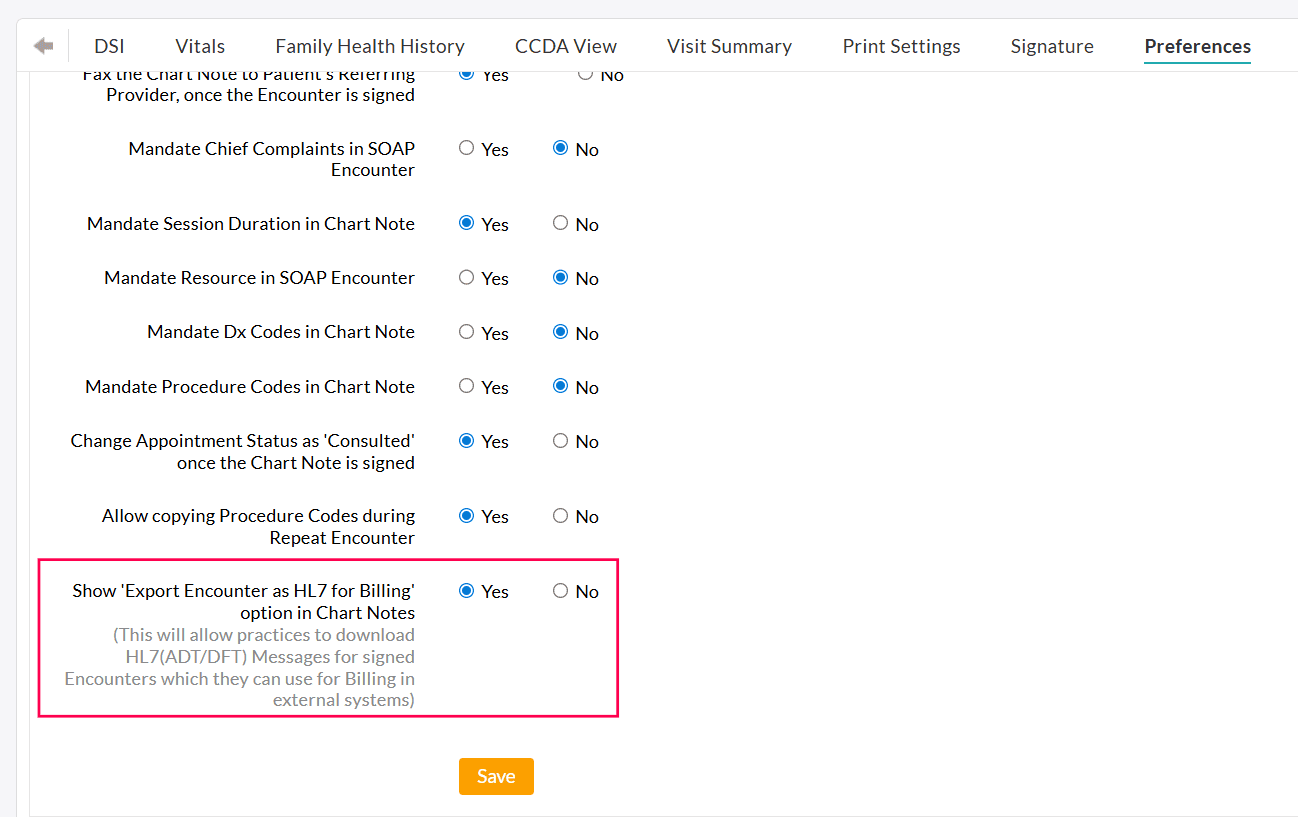
To export the Encounters, follow the steps below.
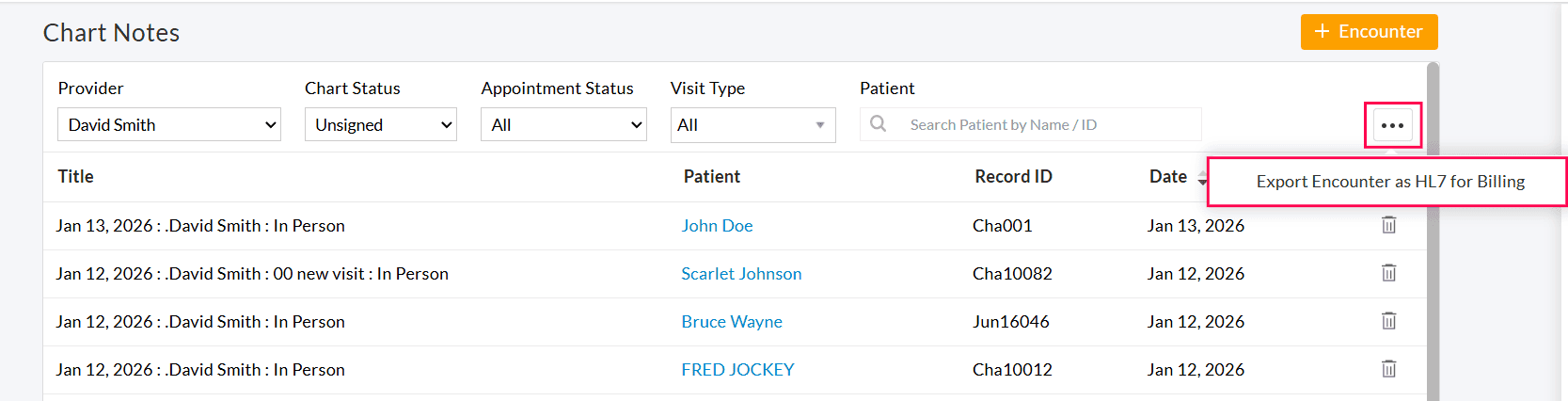
- Navigate to 'EHR Dashboard > Chart Notes'.
- Click on the 'More Actions' (...) icon in the top-right corner.
- Select the 'Export Encounter as HL7 for Billing' option.
- Choose the date range to export the Encounter details. The selected date range must be within 7 days.
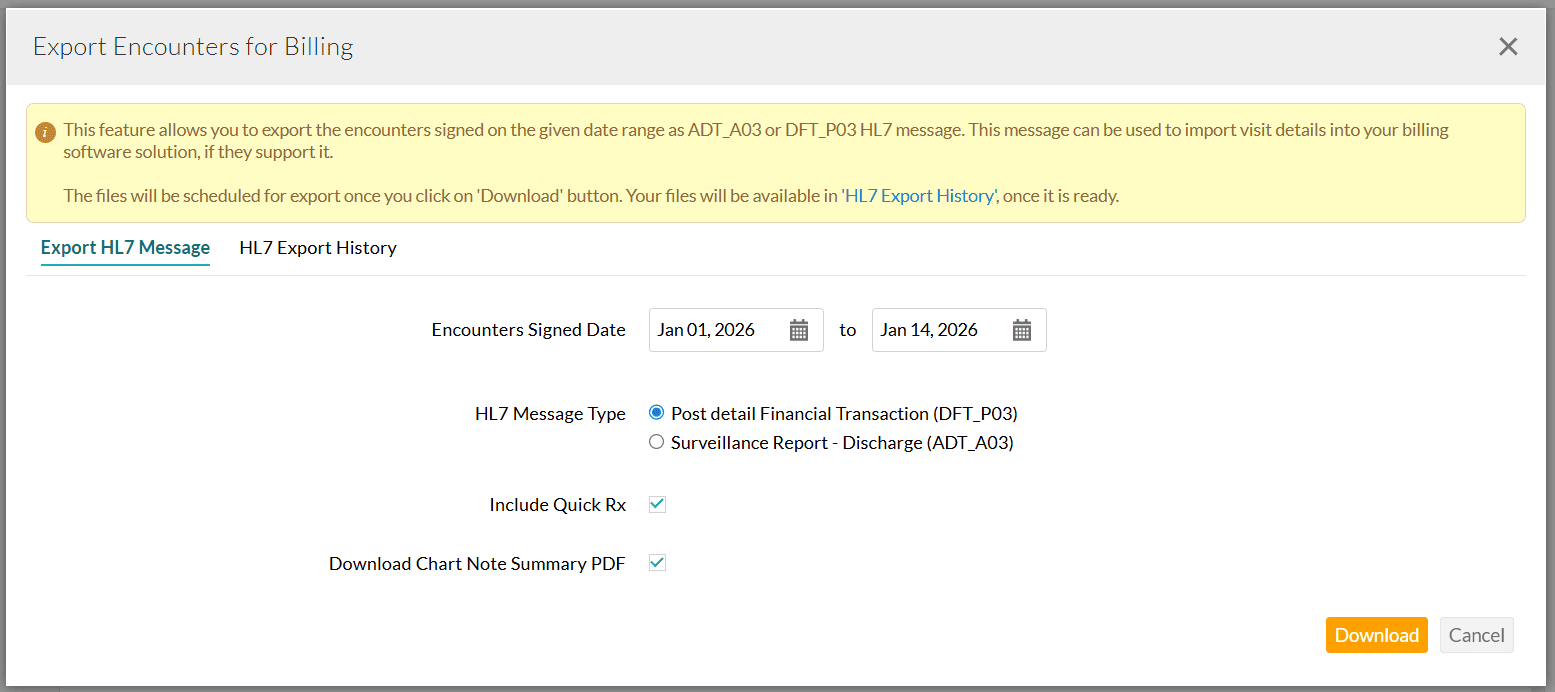
- Select the required HL7 Message Type. You can choose between:
- DFT_P03 - Post Detail Financial Transaction and
- ADT_A03 - Admit Discharge Transfer (Surveillance Report)
- Enable the 'Include Quick Rx' option to add prescription details to the HL7 file if needed.
- To download the Encounter summary PDF along with the HL7 files, enable the 'Download Chart Note Summary PDF' option.
- Click on the 'Download' button. The Encounters are scheduled for export and will be listed under the 'HL7 Export History' section.
- Once the file is ready, click on the 'Export' button to download the zip file.
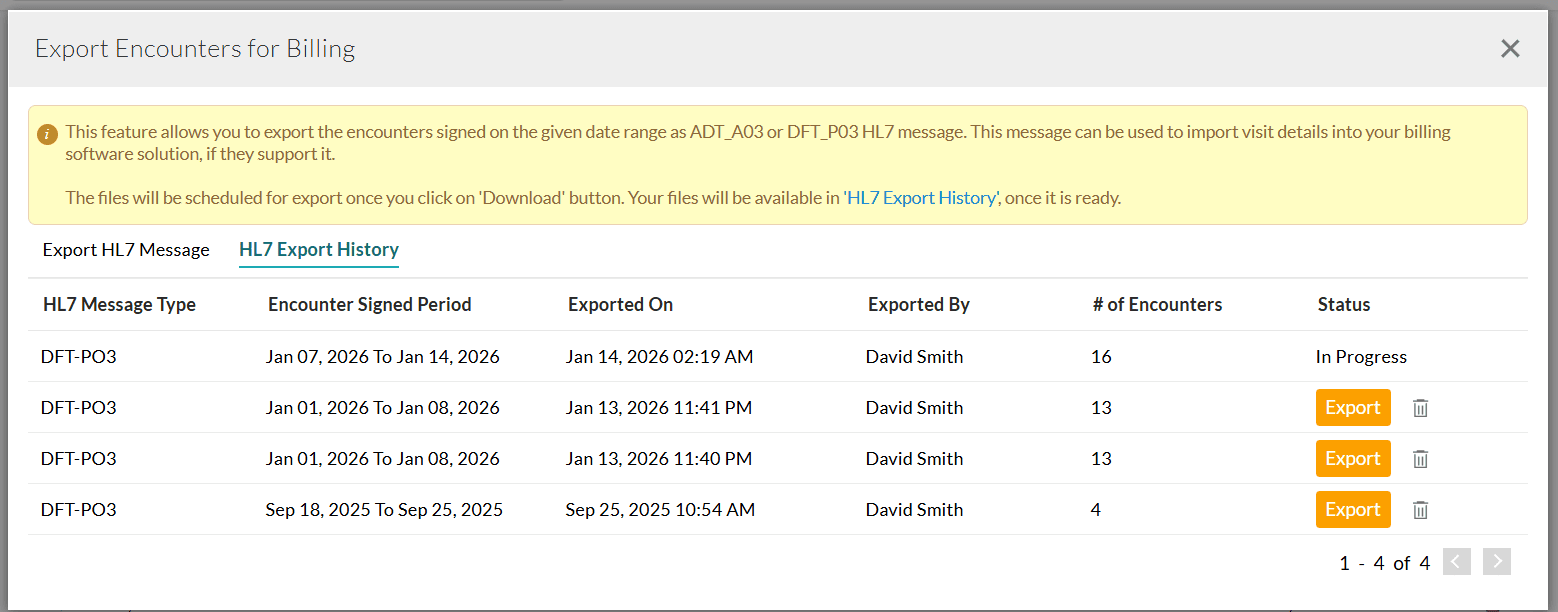
The downloaded zip file contains the HL7 Message File (txt) and Encounter Summary PDF required for billing.
Note: Only Providers with the 'Export Encounter as HL7 for Billing' privilege can export the Encounter in HL7 format.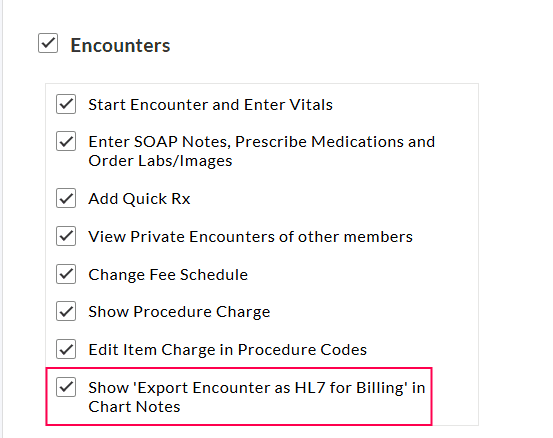
Refer to the tables below to learn about the information included in the HL7 DFT-P03 and ADT-A03 messages.
Table 1: DFT-03 Segment Description
| Segment | Field | Segment Description | Comments |
|---|---|---|---|
| MSH | 1 | Field Separator | |
| MSH | 2 | Encoding Characters | |
| MSH | 3.1 | Sending Application | 'CharmEHR' is the default value |
| MSH | 4.1 | Facility Name | |
| MSH | 4.2 | Facility NPI | |
| MSH | 4.3 | Type of the ID Qualifier | NPI is the default value |
| MSH | 7.1 | Date/Time of Message | |
| MSH | 9.1 | Message Code | DFT is the default value |
| MSH | 9.2 | Trigger Event | P03 is the default value |
| MSH | 9.3 | Message Structure | DFT_P03 is the default value |
| MSH | 10 | Message ID | |
| MSH | 11.1 | Processing ID | P - Production |
| MSH | 12.1 | Version | 2.5.1 is the default value |
| MSH | 15 | Accept Acknowledgement Type | AL - Always |
| MSH | 16 | Application Acknowledgement Type | |
| MSH | 21.1 | Message Profile - Entity Identifier | PH_SS-Ack is the default value |
| MSH | 21.2 | Message Profile - NameSpace ID | SS Sender is the default value |
| MSH | 21.3 | Message Profile - Universal ID | 2.16.840.1.114222.4.10.3 is the default value |
| MSH | 21.4 | Message Profile - Universal ID Type | ISO is the default value |
| EVN | 2.1 | Recorded Time | |
| EVN | 7.1 | Facility Name | |
| EVN | 7.2 | Facility NPI | |
| EVN | 7.3 | Facility ID Qualifier Type | |
| PID | 1.1 | Sequence ID | |
| PID | 3.1 | Patient Identifier - ID Number | Patient Record ID |
| PID | 3.4 | Assigning Authority | Facility Information |
| PID | 3.5 | Patient Identifier Type | MR - Medical Record Number |
| PID | 5.1 | Patient Last Name | |
| PID | 5.2 | Patient First Name | |
| PID | 5.3 | Patient Middle Name | |
| PID | 7.1 | Patient Date of Birth | Shown in YYYYMMDD format |
| PID | 8 | Patient Gender | |
| PID | 10.1 | Patient Race ID | |
| PID | 10.2 | Patient Race Name | |
| PID | 10.3 | Name of Race Coding System | |
| PID | 11.1 | Patient Address Street Name | |
| PID | 11.3 | Patient City | |
| PID | 11.4 | Patient State | |
| PID | 11.5 | Patient Zip Code | |
| PID | 11.6 | Patient Country | |
| PID | 11.7 | Patient Address Type | |
| PID | 11.9 | Patient Country Code | |
| PID | 13.2 | Patient Telecommunication Use Code | |
| PID | 13.3 | Patient Telecommunication Equipment Type | |
| PID | 13.6 | Telecommunication Area/City Code | |
| PID | 13.7 | Telecommunication Number | |
| PID | 16 | Patient Marital Status | |
| PID | 19 | Patient SSN | |
| PID | 22.1 | Patient Ethnicity ID | |
| PID | 22.2 | Patient Ethnicity Name | |
| PID | 22.3 | Patient Ethnicity - Name of Coding System | |
| PV1 | 1 | Set ID | |
| PV1 | 2 | Visit Type | |
| PV1 | 3.4 | Assigned Patient Location - Facility Information | |
| PV1 | 8.1 | Referring Doctor ID Number | |
| PV1 | 8.2 | Referring Doctor Last Name | |
| PV1 | 8.3 | Referring Doctor First Name | |
| PV1 | 8.6 | Referring Doctor Prefix | |
| PV1 | 19.1 | Visit Number | |
| PV1 | 19.4 | Assigning Authority | |
| PV1 | 19.5 | Visit Number Type | VN - Visit Number is the default value |
| PV1 | 44 | Admit Date/Time | |
| PV2 | 3.2 | Admit Reason | |
| PV2 | 12 | Visit Description | Chart Note Type |
| FT1 | 1 | Set ID | |
| FT1 | 4.1 | Transaction Date | |
| FT1 | 6 | Transaction Type | CG - Charge |
| FT1 | 7.1 | Transaction Code ID | |
| FT1 | 7.2 | Transaction Code Name | |
| FT1 | 8 | Transaction Code Description | |
| FT1 | 10 | Transaction Quantity | |
| FT1 | 11.1 | Transaction Amount | |
| FT1 | 12.1 | Transaction Unit Amount | |
| FT1 | 19.1 | Diagnosis Code ID | |
| FT1 | 19.2 | Diagnosis Code | |
| FT1 | 20.2 | Physician Last Name | |
| FT1 | 20.3 | Physician First Name | |
| FT1 | 21.2 | Physician Last Name | |
| FT1 | 21.3 | Physician First Name | |
| FT1 | 25.1 | Procedure Code | |
| FT1 | 25.2 | Procedure Description | |
| FT1 | 26.1 | Modifier Set ID | |
| FT1 | 26.2 | Modifier | |
| DG1 | 1 | Diagnosis Set ID | |
| DG1 | 3.1 | Diagnosis Code ID | |
| DG1 | 3.2 | Diagnosis Code Name | |
| DG1 | 3.3 | Diagnosis Code - Name of Coding System | I10C - Denotes ICD10 code |
| DG1 | 6 | Diagnosis Type | F - Final |
| OBX | 1 | Observation Set ID | |
| OBX | 2 | Observation Value Type | |
| OBX | 3.1 | Observation Identifier | |
| OBX | 3.2 | Observation Identifier Text | |
| OBX | 3.3 | Observation Identifier - Name of Coding System | |
| OBX | 5 | Observation Value | |
| OBX | 11 | Observation Result Status | |
| GT1 | 1 | Set ID | |
| GT1 | 3.1 | Guarantor Last Name | |
| GT1 | 3.2 | Guarantor First Name | |
| GT1 | 3.3 | Guarantor Middle Name | |
| GT1 | 5.1 | Guarantor Address Street 1 | |
| GT1 | 5.2 | Guarantor Address Street 2 | |
| GT1 | 5.3 | Guarantor Address City | |
| GT1 | 5.4 | Guarantor Address State | |
| GT1 | 5.5 | Guarantor Address Zip Code | |
| GT1 | 6.2 | Guarantor Telecommunication Use Code | |
| GT1 | 6.3 | Guarantor Telecommunication Equipment Type | |
| GT1 | 6.6 | Guarantor Telecommunication Area/City Code | |
| GT1 | 6.7 | Guarantor Telecommunication Number | |
| GT1 | 8 | Guarantor Date of Birth | |
| GT1 | 9 | Guarantor Gender | |
| GT1 | 11 | Guarantor Relationship to Patient | |
| GT1 | 12 | Guarantor SSN | |
| IN1 | 1 | Insurance Set ID | |
| IN1 | 2.1 | Insurance Policy Number | |
| IN1 | 2.2 | Insurance Plan Name | |
| IN1 | 2.3 | Insurance - Coding System Name | |
| IN1 | 3.1 | Insurance Payer ID | |
| IN1 | 4.1 | Insurance Payer Name | |
| IN1 | 8 | Insurance Policy Group Number | |
| IN1 | 15 | Insurance Type | |
| IN1 | 16.1 | Insured Last Name | |
| IN1 | 16.2 | Insured First Name | |
| IN1 | 19.3 | Insured City | |
| IN1 | 19.4 | Insured State | |
| IN1 | 19.5 | Insured Zip Code | |
| IN1 | 19.6 | Insured Country Code | |
| IN1 | 36 | Insurance ID Number | |
| IN1 | 43 | Insured Gender | |
| IN2 | 2 | Insured Person's SSN | |
| IN2 | 63.2 | Insured Person's Telecommunication Use Code | |
| IN2 | 63.3 | Insured Person's Telecommunication Equipment Type | |
| IN2 | 63.6 | Insured Person's Telecommunication Area/City Code | |
| IN2 | 63.7 | Insured Person's Telecommunication Number | |
| ACC | 1 | Accident Date | |
| ACC | 2 | Accident Code | |
| ACC | 4 | Auto Accident State |
Table 2: ADT-A03 Segment Description
| Segment | Field | Segment Description | Comments |
|---|---|---|---|
| MSH | 1 | Field Separator | |
| MSH | 2 | Encoding Characters | |
| MSH | 3.1 | Sending Application | 'CharmEHR' is the default value |
| MSH | 4.1 | Facility Name | |
| MSH | 4.2 | Facility NPI | |
| MSH | 4.3 | Type of the ID Qualifier | NPI is the default value |
| MSH | 7.1 | Date/Time of Message | |
| MSH | 9.1 | Message Code | DFT is the default value |
| MSH | 9.2 | Trigger Event | P03 is the default value |
| MSH | 9.3 | Message Structure | DFT_P03 is the default value |
| MSH | 10 | Message ID | |
| MSH | 11.1 | Processing ID | P - Production |
| MSH | 12.1 | Version | 2.5.1 is the default value |
| MSH | 15 | Accept Acknowledgement Type | AL - Always |
| MSH | 16 | Application Acknowledgement Type | |
| MSH | 21.1 | Message Profile - Entity Identifier | PH_SS-Ack is the default value |
| MSH | 21.2 | Message Profile - NameSpace ID | SS Sender is the default value |
| MSH | 21.3 | Message Profile - Universal ID | 2.16.840.1.114222.4.10.3 is the default value |
| MSH | 21.4 | Message Profile - Universal ID Type | ISO is the default value |
| EVN | 2.1 | Recorded Time | |
| EVN | 7.1 | Facility Name | |
| EVN | 7.2 | Facility NPI | |
| EVN | 7.3 | Facility ID Qualifier Type | |
| PID | 1.1 | Sequence ID | |
| PID | 3.1 | Patient Identifier - ID Number | Patient Record ID |
| PID | 3.4 | Assigning Authority | Facility Information |
| PID | 3.5 | Patient Identifier Type | MR - Medical Record Number |
| PID | 5.1 | Patient Last Name | |
| PID | 5.2 | Patient First Name | |
| PID | 5.3 | Patient Middle Name | |
| PID | 5.4 | Patient Prefix | |
| PID | 7.1 | Patient Date of Birth | Shown in YYYYMMDD format |
| PID | 8 | Patient Gender | |
| PID | 10.1 | Patient Race ID | |
| PID | 10.2 | Patient Race Name | |
| PID | 10.3 | Name of Race Coding System | |
| PID | 11.1 | Patient Address Street Name | |
| PID | 11.3 | Patient City | |
| PID | 11.4 | Patient State | |
| PID | 11.5 | Patient Zip Code | |
| PID | 11.6 | Patient Country | |
| PID | 11.7 | Patient Address Type | |
| PID | 11.9 | Patient Country Code | |
| PID | 13.2 | Patient Telecommunication Use Code | |
| PID | 13.3 | Patient Telecommunication Equipment Type | |
| PID | 13.6 | Telecommunication Area/City Code | |
| PID | 13.7 | Telecommunication Number | |
| PID | 16 | Patient Marital Status | |
| PID | 19 | Patient SSN | |
| PID | 22.1 | Patient Ethnicity ID | |
| PID | 22.2 | Patient Ethnicity Name | |
| PID | 22.3 | Patient Ethnicity - Name of Coding System | |
| PV1 | 1 | Set ID | |
| PV1 | 2 | Visit Type | |
| PV1 | 19.1 | Visit Number | |
| PV1 | 19.4 | Assigning Authority | |
| PV1 | 19.5 | Visit Number Type | VN - Visit Number is the default value |
| PV1 | 36 | Discharge Disposition | |
| PV1 | 44 | Admit Date/Time | |
| PV1 | 45 | Discharge Date/Time | |
| PV2 | 3.2 | Admit Reason | |
| PV2 | 12 | Visit Description | Chart Note Type |
| DG1 | 1 | Diagnosis Set ID | |
| DG1 | 3.1 | Diagnosis Code ID | |
| DG1 | 3.2 | Diagnosis Code Name | |
| DG1 | 3.3 | Diagnosis Code - Name of Coding System | I10C - Denotes ICD10 code |
| DG1 | 6 | Diagnosis Type | F - Final |
| PR1 | 3.1 | Procedure Identifier | |
| PR1 | 3.2 | Procedure Description | |
| PR1 | 5.1 | Procedure Date/Time | |
| OBX | 1 | Observation Set ID | |
| OBX | 2 | Observation Value Type | |
| OBX | 3.1 | Observation Identifier | |
| OBX | 3.2 | Observation Identifier Text | |
| OBX | 3.3 | Observation Identifier - Name of Coding System | |
| OBX | 5 | Observation Value | |
| OBX | 11 | Observation Result Status | |
| GT1 | 1 | Set ID | |
| GT1 | 3.1 | Guarantor Last Name | |
| GT1 | 3.2 | Guarantor First Name | |
| GT1 | 3.3 | Guarantor Middle Name | |
| GT1 | 5.1 | Guarantor Address Street 1 | |
| GT1 | 5.2 | Guarantor Address Street 2 | |
| GT1 | 5.3 | Guarantor Address City | |
| GT1 | 5.4 | Guarantor Address State | |
| GT1 | 5.5 | Guarantor Address Zip Code | |
| GT1 | 6.2 | Guarantor Telecommunication Use Code | |
| GT1 | 6.3 | Guarantor Telecommunication Equipment Type | |
| GT1 | 6.6 | Guarantor Telecommunication Area/City Code | |
| GT1 | 6.7 | Guarantor Telecommunication Number | |
| GT1 | 8 | Guarantor Date of Birth | |
| GT1 | 9 | Guarantor Gender | |
| GT1 | 11 | Guarantor Relationship to Patient | |
| GT1 | 12 | Guarantor SSN | |
| IN1 | 1 | Insurance Set ID | |
| IN1 | 2.1 | Insurance Policy Number | |
| IN1 | 2.2 | Insurance Plan Name | |
| IN1 | 2.3 | Insurance - Coding System Name | |
| IN1 | 3.1 | Insurance Payer ID | |
| IN1 | 4.1 | Insurance Payer Name | |
| IN1 | 5.1 | Payer Address - Street 1 | |
| IN1 | 5.2 | Payer Address - Street 2 | |
| IN1 | 5.3 | Payer City | |
| IN1 | 5.4 | Payer State | |
| IN1 | 5.5 | Payer Zip Code | |
| IN1 | 8 | Insurance Policy Group Number | |
| IN1 | 15 | Insurance Type | |
| IN1 | 16.1 | Insured Last Name | |
| IN1 | 16.2 | Insured First Name | |
| IN1 | 17 | Insured Person's Relationship to Patient | |
| IN1 | 18 | Insured's Date of Birth | |
| IN1 | 19.1 | Insured Address | |
| IN1 | 19.3 | Insured City | |
| IN1 | 19.4 | Insured State | |
| IN1 | 19.5 | Insured Zip Code | |
| IN1 | 36 | Insurance ID Number | |
| IN1 | 43 | Insured Gender | |
| IN2 | 2 | Insured Person's SSN | |
| IN2 | 3.3.00 | Insured Person's Telecommunication Use Code | |
| IN2 | 3.3.00 | Insured Person's Telecommunication Equipment Type | |
| IN2 | 3.3.00 | Insured Person's Telecommunication Area/City Code | |
| IN2 | 3.3.00 | Insured Person's Telecommunication Number |